Please, read the following carefully to learn the good practices and how to distinguish a legitimate e-mail from a phishing e-mail:
1. Assess the content of the email.
Is it a surprising, urgent or unexpected request, or a reply to a request that has never been made before? Incomprehensible sentences and spelling mistakes? Foreign language? Requests for personal information and access data? If so, it’s clearly phishing. Don’t reply and move on. And if in doubt, consider point 2.
Example: you receive an email informing you that your user account has been activated, but you have not made any corresponding request, or you have already had an account for a long time.
2. Identify the sender of the email with certainty.
Don’t be fooled by the sender’s name displayed in your inbox. Depending on the email interface you are using, you can simply position the mouse over the sender to display the full email address.
Example: you receive an email where the sender displayed is ‘LinkedIn’; when you check the sender, you see the address ‘linkedIn@newsl.ch’. In this case, the information displayed about the sender (‘LinkedIn’) seems consistent but the email address recorded in the email header is ‘bogus’ (@newsl.ch).
3. Identify suspicious links in the email.
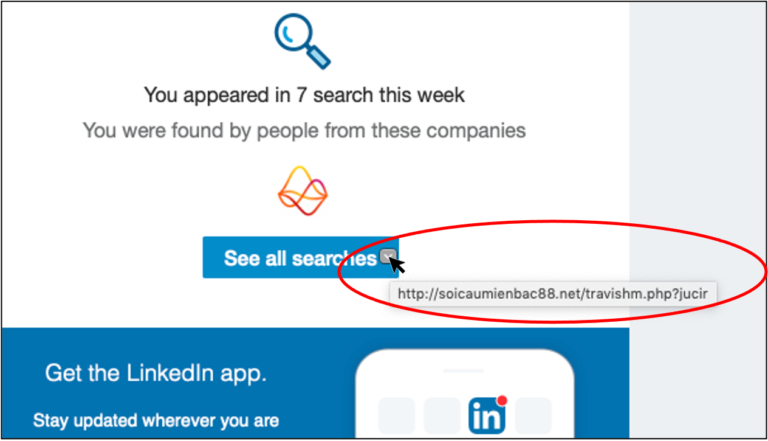
Think before you click! Before clicking on a link, check that the address matches. To do this, place your mouse over the link and wait for it to be displayed. If the link is known, you can continue. If not, don’t click!
Example: the link to an ‘unsecured’ page (http:// and not https://) is suspect and the URL displayed (soicaumienbac8.net) is fraudulent.
4. Do you have any doubts or have you identified a phishing attempt?
If you have any doubts about the origin of an email, do not open it and call the person in charge of IT, who will provide you with information.
If you have identified a phishing attempt, report it to the person in charge of IT. By doing so, you will be helping to keep yourself and your colleagues safe!
To find out more, visit the dedicated pages of iBarry, the platform for internet security: